
Learning
Opening my course
Once your registration is approved, the course opens from My Training.
My Training
Click My Training in the menu. Your courses are grouped:
- In progress: courses you have started. Click Continue to go back to where you left off.
- New: courses you have not started yet. Click Open course.
- Completed: courses you have finished, or whose batch has ended.
Each card shows the batch dates (or, for a self-paced course, your access dates) and the trainer. Recommended for You below suggests other courses.
Waiting for approval? Your course is not here yet. See Registering for a course › What happens next.
The course page
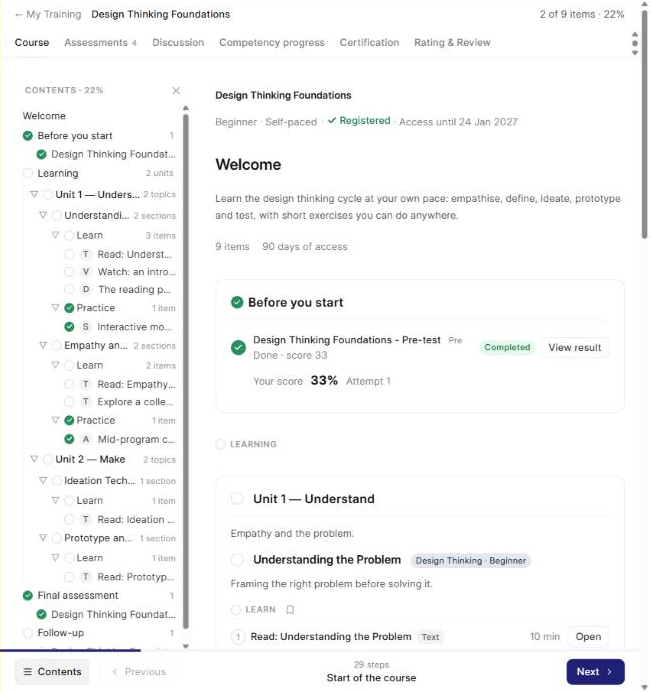
The top of the page shows the course name, its level and format, and Access until for a self-paced course. The course is laid out in parts, from top to bottom:
- Welcome: what the course is about, what you will learn and the skills you build.
- Before you start: your pre-test and its result.
- Learning: the course's lessons, activities and tests, grouped the way your course is set up. Click Open on an item.
- Learning assessments, Final assessment and Follow-up: the tests for the course, with their status and your score.
Moving around
- Next and Previous at the bottom take you through the course one step at a time.
- Contents opens the outline of the course. Click a part to jump to it.
- ← My Training at the top takes you back to your courses.
The tabs
| Tab | What you find there |
|---|---|
| Course | The course itself (above). |
| Assessments | All the tests of the course in one list, with how many you have completed. See Taking an assessment. |
| Discussion | Messages with your trainer and batchmates. See The discussion forum. |
| Competency progress | How your skills have grown in this course. See My progress and levels. |
| Certification | What is still needed for your certificate. See My certificate. |
| Rating & Review | Rate the course and your trainers. See Giving feedback and ratings. |