
Finding and joining a course
Registering for a course
You register for a batch: one run of a course, with its own dates and place. You need an account and must be signed in.
Register
- Click Register on a course card, or next to a batch on the course page. The course and batch are filled in for you.
Or click Register in the top menu and choose the Training Program and Batch yourself. - Check the Registration Confirmation: the course, the batch dates and place, seats left, the Register by date and the fee. Show schedule shows the dates of each topic.
- Click Submit Registration. You see Registration submitted.
Good to knowIf you have a membership, or bought a learning path that includes the course, the fee shows that you will not be charged.
What happens next
Open Your Registrations in the menu. Each registration shows its status and, in a yellow box, what to do next.
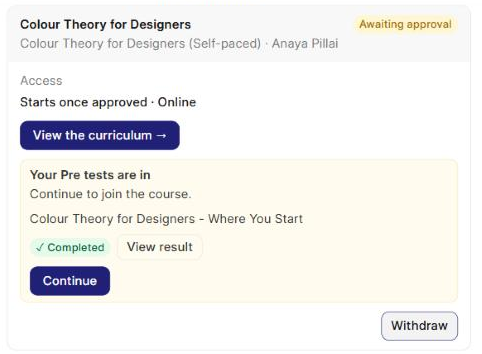
- Pre-tests: if the batch has any, click Start on each. Your registration cannot go ahead until they are in. See Doing my pre-test.
- Acceptance: some courses accept you straight away. Click Continue (or Continue to payment). For other courses, a Manager reviews your registration and you get a notification when it is decided.
- Payment: for a paid course, the status becomes Accepted - payment due. Click Pay now. See Paying for a course.
Once it is Approved, the course opens from My Training.
What the statuses mean
| Status | Meaning |
|---|---|
| Awaiting approval | Submitted. Take any pre-tests, then continue or wait for a Manager to accept you. |
| Accepted - payment due | You are accepted. Pay to confirm your seat. |
| Approved | You are in. A self-paced course shows your access dates. |
| Waitlisted | You are on the waiting list. You will be told if a seat opens. |
| Not approved | Your registration was not accepted. If you have questions, raise a support ticket. |
| Withdrawn | You withdrew. See Withdrawing and registering again. |
| Batch cancelled | The batch will not run. |
A Note from the training team may appear on a registration.
Good to knowIf your organisation checks profiles, you may see Your profile is not yet verified. Your registration can be approved only after a Manager verifies your profile. See Setting up my profile.
Something not working
| Message | What to do |
|---|---|
| You need an account to register for a batch. | Click Log in or sign up. You come back to the same page. |
| This batch is full | Choose another batch, or raise a support ticket. |
| Registration for this batch has closed | The Register by date has passed. Choose another batch. |
| This batch is not open for registration | The batch has started or been closed. Choose another batch. |
| You are already registered for this batch. | See it in Your Registrations. |