
Start here
Setting up my profile
Your profile tells the academy about you: contact details, work, education and documents. You can fill it in bit by bit and change it any time.
Open your profile
- At the top of the menu on the left, click your name.
- Click Profile settings.
Good to knowA Manager may check your profile and mark it Verified. If your organisation asks for this, your registration is approved only after your profile is verified, and your registrations show "Your profile is not yet verified" until then.
What your profile needs
The box at the top of Profile Settings shows what is done (✓) and what is still missing (○).
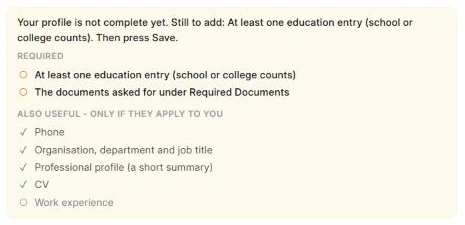
- Required: at least one education entry (school or college counts), and the documents your organisation asks for under Required Documents.
- Also useful, only if they apply to you: phone, work details, a short professional profile, CV, work experience.
A missing item does not stop you using the portal. It is a reminder.
Fill in or change your profile
- On Profile Settings, scroll down and click Edit (below Other Documents).
- Fill in or change what you need:
- Contact: alternate email, phone, alternate phone. Your main email is your sign-in and cannot be changed here.
- Interested domains: 1 to 3. Recommended courses use them.
- Work: organisation, department, designation, manager or supervisor, and a short Professional Profile.
- Work Experience: click + Add work experience. Give the job title, organisation and dates (or tick I work here now).
- Education: your Highest qualification, then + Add education. Give the level or degree, the institution and the status. Completed asks for the year; In progress is fine for current students.
- Certifications: click + Add certification.
- Documents: upload your CV, portfolio, ID document and education certificate.
- Required Documents: the documents your organisation asks for (a * means it is needed). Upload a file or paste a link.
- Other Documents: anything else, such as an award or a sample of your work.
- Click Save. You see "Profile saved."
Good to knowEverything in the form is saved together when you click Save. You can save a part-filled profile and come back later. In a row you added, fields with * must be filled, or click Remove to drop the row.
Change your name
- At the top of Profile Settings, click Edit under your name.
- Change it and click Save.
Your date of birth cannot be changed here. If it is wrong, raise a support ticket.
To change your password, click Reset password at the bottom of Profile Settings. See Set or reset your password.
Something not working?
| What you see | What to do |
|---|---|
| The Upload buttons are grey | Click Edit first (below Other Documents). |
| Keep at least one interested domain (choose 1 to 3). | Select at least one domain, then Save. |
| Save shows a message about a row | Fill the fields marked * in that row, or Remove the row. |
| Your profile is not yet verified. on your registrations | Complete your profile. A Manager verifies it. |
| My email or date of birth is wrong | Raise a support ticket. |