
Creating my account and signing in
Create your account, verify your email, sign in, and set or reset your password.
Create your account
- On the home page, click Login (top right).
- Under New here?, click Sign up.
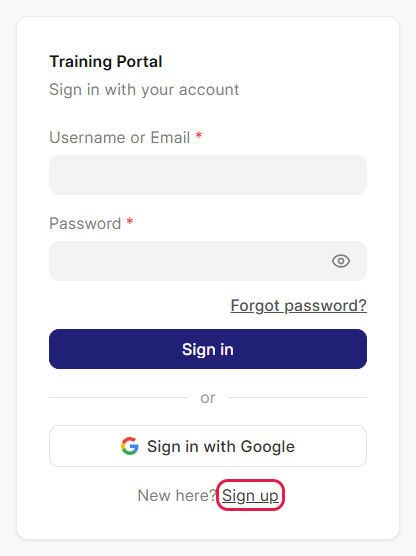
The sign-in page. Sign up is at the bottom. - Fill in your name, Email, Date of Birth and a Password (typed twice). Use an email you can open now: we send a link to it.
- Under Interested Domains, click 1 to 3 subjects you like. A selected subject gets a dark outline.
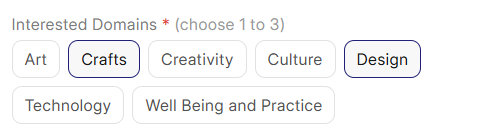
Crafts and Design are selected. - Click Read the Terms & Conditions and Privacy Policy to open them, read them, then tick I agree to the Terms & Conditions and Privacy Policy. You cannot sign up without ticking it.
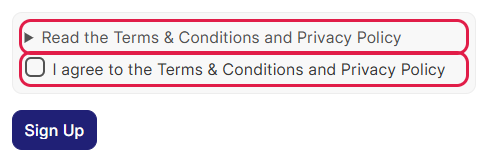
Click the arrow to read the terms, then tick the box. - Click Sign Up.
Verify your email
We email you a link to confirm your address. You cannot register for a course until you open it.
- Open the email from the Training Portal (check spam if it is not in your inbox).
- Click the link. You see Your email is verified.
Not verified yet? A yellow message says Please verify your email address. You see it when you sign in, and on the Register page. Click Send a new link in it to get a new email.
If your account was created for you, you do not need to verify. Go to Set or reset your password.
Sign in
- On the home page, click Login.
- Enter your Username or Email and Password, and click Sign in.
- Not registered for a course yet? You see Registration Pending, with a Register for a Batch link and the list of your registrations.
- Registration approved? You go to your Dashboard.
To fill in your profile, click your name at the top of the menu, then Profile settings (see Setting up my profile).
Sign in with Google: works only with the same Google email your account uses. It does not create an account.
Set or reset your password
Use this if you forgot your password, or if your account was created for you.
- On the sign-in page, click Forgot password?
- Enter your Email and click Send link.
- Open the email, click the link and set a new password.
- Sign in with the new password.
Something not working?
| What you see | What to do |
|---|---|
| An account already exists for this email. Please log in instead. | Sign in, or use Forgot password? |
| Passwords do not match | Type the same password in both boxes. |
| Choose 1 to 3 interested domains | Select at least one subject, and no more than three. |
| This link has expired | Sign in and click Send a new link in the yellow message. |
| This link does not work | You opened an older email or part of the link. Sign in and click Send a new link. |
| I cannot register for a course | Verify your email first (see above). |
| Sign-in fails with the right password | Use Forgot password? to set a new one. |
| We couldn't send the link right now | Try again in a few minutes. If it still fails, use the contact details at the bottom of the website. |
Still stuck? Use the contact details at the bottom of the website, or raise a support ticket once you can sign in (see Getting help).