
Finding a course
All courses are listed on the home page, under Training Programs. You do not need an account to browse them.
Search and filter
- Search: type a course name, a topic or a skill.
- Domain: click a domain, such as Design or Technology. Click All domains to see everything again.
- Sort: Recommended, Starting soonest, Price (low to high or high to low), or Name A to Z. When you are signed in, Recommended puts the courses that suit you first.
- Filters: click Filters and choose a Level, Format (In person, Online, Hybrid, Self-paced), Price (Free or Paid) or Availability (Open for registration). Click Show N programs. The number on the Filters button shows how many are on; Clear all removes them.
Reading a course card
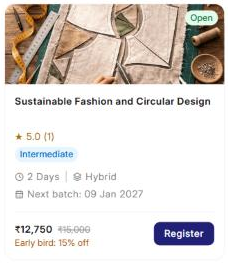
Each card shows the course's status, rating, level, length, format, next batch and price.
| Status | Meaning |
|---|---|
| Open | A batch is open with seats left. You can register. |
| Upcoming | No dates yet. Next batch shows To be announced. |
| Full | No seats left in the open batches. |
| Registration closed | Registration for the batch has ended. |
A crossed-out price means an offer, such as an early bird discount, is on. Self-paced courses show Start any time.
The course page
Click a course card to open its page. It shows:
- Introduction and Learning outcomes.
- Curriculum and schedule: the topics, day by day. Collapse all folds them up.
- Trainers who teach the course.
- Available batches: filter by Starting from and Location. Select a batch to see its dates in the curriculum, then click Register.
Click ← All Programs to go back to the list.
Learning paths
A learning path is a set of courses taken in order. Finish every course in it to earn the path certificate, as well as each course's own certificate.
Paths are listed under Learning Paths, below the courses. Each card shows how many courses it has, its length and its price. Buying the whole path can cost less than the courses one by one (Save N%).
- View path opens the path page: what you will learn and the courses in order.
- Buy path asks you to sign in (or create an account) first.